ethereal plane
ethereal plane is both a guide into digital communication networks and a server in itself, although not that ethereal at all: It is a salvaged computer that is here right in front of you. It is called a server because it is computer running services that can be accessed through a network.
Today we will travel inside it together. We will share one memory, build something that lives in it, in what we usually categorise as the internet, and then reach past it with alternative communication networks.
This is a practical guide, and a bit demanding, in the way that it challenges the notion of technical vs. non-technical people. It is written for any user, that can get the assistance of a facilitator with some UNIX/Linux system administration experience to solve out the threads that will be entangled in the process. As a user, the most important is to collect the courage needed to type what you see, and reflect about the politics and poetics of digital communication networks while sensing its materialities through remote login (ssh/soul journey) and sharing a terminal (tmux/soul merging).
The aims of ethereal plane is to expose the aesthetic, poetic and playful dimensions of digital communication networks beyond capitalist and exctractivist modes, based on free/libre and open technologies, and using them for something directed towards the cause of civil society such as self- and community-hosting, and alternative anti-authoritarian communication networks.
a window into the machine
installing and using a terminal
A terminal is a text window, and your primary entry point for accessing other servers. The terminal is an interface between humans and computers, usually without graphical elements such as icons and cursors. Everything we do today will happen inside one. terminal is derived from a physical terminal, consisting of a screen and a keyboard, plugged into computers, servers, or back in the days mainframes (although still used in some industries), and was once the only way to access them.
Too, Like so many magical things, the secular world will always try to deform and defang it. Modern tech culture will describe the command line as an obscure productivity tool; something you learn only to impress other tech folk (a meaningless activity) or to become a “power user” (a meaningless phrase). Conventional tech wisdom will tell you that the command line is an intimidating, obscure, imposing place -- impossible to learn and dangerous to use. This is only an attempt to hide its true nature: the command line is a place made entirely of our first occult technology, the word.
The command line is pure language, and to exist in it is to practice all the reality-shifting and world manifesting power of metaphor and dialogue. This is a place of empowerment, tangible creativity, and mystic bewilderment. While it can be dangerous, it’s also exceedingly helfpul if you know how to listen. - the map is the territory
- GNU/Linux and MacOS: you already have a terminal. Search for Terminal in your applications. This might be named otherwise in GNU/Linux
- Windows: you need to install WSL, a Linux layer inside Windows. Follow the two steps below.
Windows only: install WSL
-
Open PowerShell as Administrator: right-click the Start menu, choose Terminal (Admin), and run:
Restart your computer when prompted. When it comes back, Ubuntu will open and ask you to create a local username and password. These can be anything simple.wsl --install - Search for Ubuntu in your Start menu and open it. This is your terminal.
Once your terminal is open you will see a cursor waiting for you to type with a $ sign in front. This indicates the shell, the place where you give the computer instructions in plain text.
This is the interface to your own computer.
Try a few things to get your bearings:
whoamipwdlscd [directory that you noticed when writing ls]whoami tells you who you are on this system. pwd (print working directory) tells you where you are. ls lists the files in your current directory. cd (change directory) is for moving around on the filesystem like if you were clicking on folder on your usual desktop.
soul journey
ssh: projecting your soul into another machine
SSH stands for Secure Shell. When you type an SSH command, your terminal stays on your own computer, but everything you type is sent, encrypted, across the network and executed on a machine elsewhere. In this case, just in front of you. You will see its responses as if you were sitting at its keyboard.
Your body stays here. Your soul is travelling through the wifi receiver, into the router, that connects you to the server.
-
Connect to the local network: Make sure your computer is on the same wifi as the server. Ask the facilitator for the network name if you do not see it. The code is on the bottom of the router. It is called:
ethereal plane -
Project yourself into the ethereal plane: Type this into your terminal and press Enter:
The first time you connect, the computer will ask if you trust it. Typessh spirit@192.168.1.50yesand press Enter. Then it will ask for a password:
When you type a password in a terminal, nothing appears on screen, not even dots. This is normal. Type it and press Enter.password -
You are inside: Your prompt has changed. You are no longer on your own computer. Try a few things again to get your bearings and notice how the output has changed:
whoamipwdlscd [directory that you noticed when writing ls]whoamitells you who you are on this system.pwd(print working directory) tells you where you are.lslists the files in your current directory.cd(change directory) is for moving around on the filesystem like if you were clicking on folder on your usual desktop.
soul merging
tmux: inhabiting the same terminal
tmux is a terminal multiplexer, a program that can manage terminal sessions and keep them alive and lets multiple people attach to it at once. When one person types, everyone sees it in real time, and in is a common tool for collaboration in system administration for sharing one pair of hands.
Your souls are merging into one.
-
The first person: open the shared space: One person (likely the facilitator) creates the shared session:
You are now inside a tmux session named merged-soul. A status bar appears at the bottom of your terminal as an indicator.tmux new -s merged-soul -
Everyone else: attach to the shared space: After SSH'ing in (same steps as above), run:
You are now inside the same terminal as everyone else. When one person types, you all see it move.tmux a -
Navigating tmux: tmux shortcuts always start with
Ctrl+B(hold Control, press B, release both, then press the next key):Ctrl+B, dto detach, leave without closing the sessionCtrl+B, wto get an overview of your tmux windows and sessionsCtrl+B, ?to see all shortcuts
a piece of community-hosted internet
writing a website, together, in plain text
The server is already running a web server showing this page, a service that listens for browsers and other clients asking for webpages and sends them back. We are going to write one together.
A website is a text file. Obscuring it by making it complicated is optional: for this guide - as it is not a guide on web development - we will keep it damn simple. For starting making websites the tutorials How to make a damn website and then HTML for people are recommended.
-
Navigate to the website's directory:
cd /var/www/html
You will see the existing files, probably a default placeholder page.ls -
Open the page in a text editor: We will use nano, a text editor known for being simple that lives entirely in the terminal (other recognised text editors count for example vim and emacs, and are worth checking out):
You are now editing the file your web browser will display. What you write here is what anyone visiting the site will see.nano index.html- Arrow keys to move around
Ctrl+Othen Enter to save (write Out)Ctrl+Xto exitCtrl+Kto cut a line
-
Write the page together: Delete what is there and start from a blank canvas. Here is a minimal structure to begin with. Change it, break it, write something your own:
take turns adding something: a line, a word, a thought.<!DOCTYPE html> <html> <head> <meta charset="UTF-8"> <title>ethereal plane</title> </head> <body> <h1>ethereal plane</h1> <p>This page was written together</p> </body> </html>
If you want, you can add styling and links to it as well, but it is more important to write HTML that can be read clearly even without styling (Semantic HTML). -
Save it and see it: Press
Ctrl+Othen Enter to save, thenCtrl+Xto exit nano. Open a browser on any device and visit:etherealplane.communal.computer
reticulum
the hermits brew: local and planetary communication networks for the people.
While soul journeying over SSH is the internets doctrinally approved way of achieving transendence, reticulum is the brew composed by hermits for not going through any authoritarian portals. The hermits thrive being untraceable, for their secrets and lifes are their own. In a ceremonial activtion of the brew the hermits can connect to each others caves with no sign of existence to kings, states or land-owners, and securely pass on messages in a mesh of both local and planetary networks.
The internet you just used is hierarchical. Every message you send passes through infrastructure, owned by companies, corporations, and nations: submarine cables, governed internet exchanges, data centres, internet service providers, and routers, before arriving anywhere.
Reticulum is a cryptography-based networking protocol designed for the opposite: decentralised, low-power, low-profile, and able to run over pretty much any imaginable hardware: Made of a myriad of independent, interconnectable and autonomous networks. Reticulum is Unstoppable Networks for The People. In this specific guide with the example of LoRa (long-range radio), small radio modules that send data over the air. Messages travel peer-to-peer, hopping between devices, without any central authority.
We live in a world of increasing digital censorship, and are rarely completely in charge of our communications. Even if we choose to use "better" alternatives to WhatsApp, Instagram, etc., we are still always completely reliant on the one underlying network, i.e. "The Internet". With the push of a button, "The Internet" may all of a sudden become unavailable. In places with oppressive regimes, this has not been uncommon. In the current political climate, it would not be surprising if any political system all of a sudden became repressive. - LAG
We will use the core command-line utilities that comes with Reticulum Networking Stack (rns), the first implementation of Reticulum, as well as nomadnet, a terminal application for browsing pages and sending messages over Reticulum. First, we need to start Reticulum on the server and get an address.
-
Configure the LoRa interface: Reticulum stores its configuration at
~/.reticulum/config. Open it:
Add or verify a LoRa interface entry. The facilitator will confirm the correct serial port and radio settings for the devices in the room, but it looks like this:nano ~/.reticulum/config
Save with[[RNode LoRa Interface]] type = RNodeInterface enabled = yes port = /dev/ttyUSB0 frequency = 867200000 bandwidth = 125000 spreadingfactor = 8 codingrate = 5 txpower = 7Ctrl+Othen Enter, exit withCtrl+X. -
Start the Reticulum daemon: Run this on the server:
rnsd -s -q &-sensure it is ran as a service and logs to a file.-qruns it quietly without filling the screen with log output. Reticulum is now running and shoudl be listening listening through the LoRa device.&runs the command in the background. -
Check that the network is up:
To ensure this this command is useful: you should see the interfaces Reticulum has opened. The LoRa interface should appear as active. Each interface has an address printed next to it.rnstatus -
Create your identity: Your identity is a cryptographic address. Generate it:
You will see a long hexadecimal string. This is the servers address on the Reticulum network. Write it on paper or send it to each other so it is noted properly.rnid -g ~/.reticulum/storage/identities/etherealplane -a etherealplane -
Announce your address: In Reticulum, an address cannot be reached by others until it has been announced on the network. An announcement is how your node says "I am here" to the rest of the mesh. Without it, no probe, message, or path lookup will find the server.
rnid -i ~/.reticulum/storage/identities/etherealplane -p -a etherealplane.node-iis the path to the servers identity file,-pprints the hash,-ais the aspect, the name you are announcing under. The announcement propagates through the mesh and the other nodes in range will learn a path to you. -
Probe another node: Setup another server with the instructions we just went through, or use the app Sideband on a smartphone with a LoRa microcontroller (either with usb-c or bluetooth). Remember to announce its address. From the server, confirm that your radio signal is reaching them:
If the probe returns a response, your two devices are talking through the LoRa hardware. The latency will be higher than anything you are used to. This is normal.rnprobe etherealplane.node <address> -
Launch nomadnet:
nomadnet is a full terminal application that runs over Reticulum. It has a message, a page (micron) and a file system, and a node browser. Navigate with arrow keys and Enter.nomadnetBefore anyone can message you inside nomadnet, you also need to announce yourself from within the application. nomadnet can use its own LXMF address (for messaging) and node address (for pages) that are separate from the
rnididentity you announced earlier:- Go to the Network tab
- Press
Ctrl+lgo to the bottom in the window "Local Peer Info", and click Announce Now - Wait for the other computer or device using Reticulum do the same, you will see their announces appear in the Announce Stream
To send a message:
- Go to Conversations in the menu
- Press
Ctrl+nto start a new conversation - Enter the other computers address when prompted, or pick them from the announce stream
- Type your message and press Enter to send
-
Your message left through the application using Reticulum Networking Stack from one computer as radio waves through the LoRa microcontroller. It arrived in peer-to-peer manners at the other LoRa microcontroller avoiding going through the hierarchal internet. It did not pass through surveilled corporate and government network entities, it moved through the air from one computer to another, and that was enough to transmit and receive a message.
This is what a distributed network feels like: It is controlled by whoever is running it.
This is a simple peer-to-peer networking example. Reticulum has what is called, in Reticulum terminology, transport nodes (that can be configured for the same myriad of devices e.g., LoRa, WiFi antennas, HAM radios), that works as hops between devices. Hops is the intermediate steps of routers, gateways, nodes, a network packet travels to reach its destination, like sending a letter to a friend in another city: Instead of delivering it directly, you hand it to your local post office. They look at the destination, then pass it to the next post office closer to your friend, which passes it to the next one, and so on until it arrives. This makes distances - reachability - of the reticulum network much larger and can in theory stretch from, e.g., Kalaallit Nunaat to Iran, or even between planets, controlled and governed in private by whom it is urgent for being able to communicate.
leaving ethereal plane
-
Detach from the shared tmux session without closing it, so others can keep working:
Ctrl+B, then d -
Close your SSH connection:
You are back on your own computer, although energy is still passing through the network.exit
references
- "merged soul pedagogy, Seving Gossips". XPUB & Lens-Based wiki. https://pzwiki.wdka.nl/mediadesign/Serving_Gossips. Accessed 2026-04-21.
- "The Map Is the Territory". solarpunk.cool (zine). https://solarpunk.cool/zines/map-is-the-territory/. Accessed 2026-04-21.
- "Reticulum". Reticulum Network. https://reticulum.network/. Accessed 2026-04-21.
- "Low-profile and low-energy autonomous networking with Reticulum". LAG, Amsterdam. https://radar.squat.net/en/event/amsterdam/lag/2026-02-22/low-profile-and-low-energy-autonomous-networking-reticulum. Accessed 2026-04-21.
- "How to Make a Damn Website". Louie Mantia. https://lmnt.me/blog/how-to-make-a-damn-website.html. Accessed 2026-04-21.
- "HTML for People", Blake Watson. https://htmlforpeople.com/. Accessed 2026-04-21.
appendix
for the facilitator: equipment
This is what is needed (and optionals) to run the workshop.
the server
- a salvaged computer running a recent GNU/Linux distribution: Re-use hardware whenever possible.
- at least one free USB port for the LoRa device
- installed and configured in advance:
openssh-server,tmux,nano, a web server (nginxorapache2),rns(Reticulum), andnomadnet - a user account named
spiritwith a known password, shared with participants on the day - the writable web root (
/var/www/html) made group-writable so participants can editindex.htmlcollectively
participants
- their own laptop (any operating system)
- Windows users could ideally install WSL before arriving, but the guide covers this if not
local network
- a wifi router, ideally one you control (rename the SSID to ethereal plane for the occasion)
- ethernet cables to plug the server directly into the router
- an upstream internet connection (for WSL installs and package fetches only, the workshop itself runs locally. Optional to expose the co-authored website on the internet)
- optional, for public reachability: an SSH tunnel via Pangolin and newt to a VPS, or another physical server, with a public IP, or open ports and a dedicated IP on the router but be aware to expose your local network
reticulum mesh
- at least two LoRa ESP32 devices, one connected to the server via USB and one or more separate nodes (a second laptop, a handheld device, another salvaged machine) to message between
- recommended hardware: LILYGO T3-S3 or Heltec WiFi LoRa 32 V3
- each device flashed with RNode firmware before the workshop
- all devices configured for the same frequency, bandwidth, and spreading factor
- USB cables (and adapters) for every device
the room
- power strips, enough outlets for everyone
- a projector or screen, optional but helpful when sharing terminal session
colophon
by
anders aarvik, 2026
license
scenarios
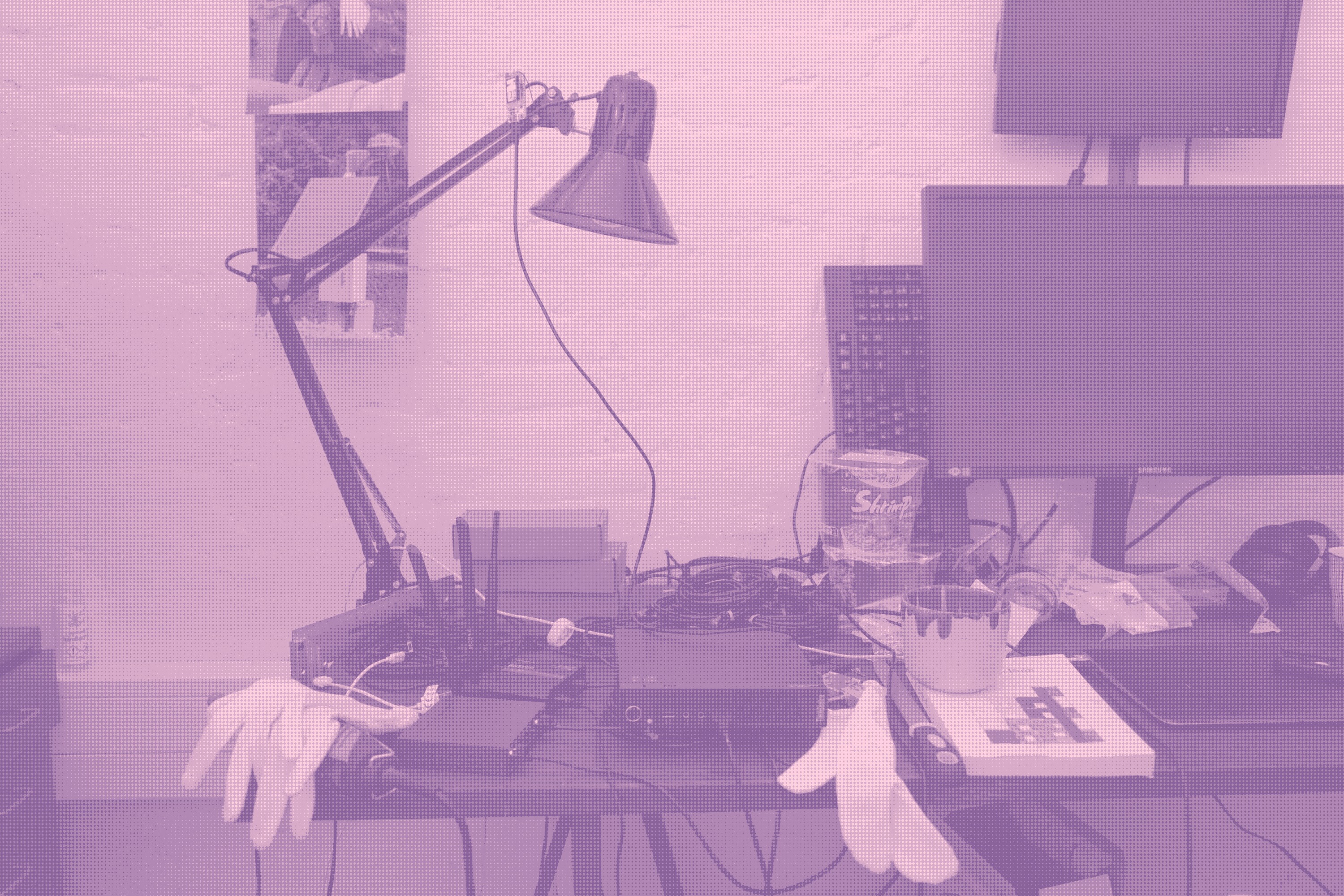 on the picture: studio desk with random stuff such as instant noodles, books and archival gloves. Central is a tinypc, a router, a switch and a LoRa device in the desk lamp. These composes the infrastructure of ethereal plane beside the VPN tunnel that sometimes enables ethereal plane to be exposed to the internet (2026-21-04).
the picture is rasterised with imagemagick with the same pink tint as the links on this website. A colour I think should be distributed more on the web. To rasterise your own images with a similar tint it can be done with
convert [image.{jpg,png,etc.}] -colorspace gray -ordered-dither h8x8o,4 +level-colors "#8a639c","#ffd0e0" converted.jpg.
contribute
to contribute images of your own scenarios with ethereal plane send an image to etherealplane@kollektiv.email or make a pull request on the git repository. To contribute to the guide itself make a pull request on the git repository.